Minecraft Cushion Guide: How to Sit, Craft Cushions & Fix Placement Problems
Cushion
By GamerCubic Editorial Team
Edited by: GamerCubic Team
Last checked: September 21, 2026
Version checked: Minecraft Java Edition 26.3 / Bedrock Edition 26.50 — Wilderness Bound
According to Mojang’s final Minecraft Java 26.3 release notes, Cushions give players a proper way to sit down in vanilla Minecraft without hiding minecarts, using boats, installing mods, or relying on commands. Cushions are colorful placeable seats crafted from Wool Slabs, and they can be used in houses, campsites, cafés, living rooms, castles, and other builds.

Cushions are now included in the stable Wilderness Bound release for Java Edition 26.3 and Bedrock Edition 26.50. Players on older versions will not see the item in normal vanilla gameplay.
Quick Takeaway: Craft a Cushion with three matching Wool Slabs, place it on a supported surface, interact with it to sit, and use Sneak to stand back up. ✅
What Is a Minecraft Cushion?
A Minecraft Cushion is a functional decorative seat that allows a player to sit directly on a block-like furniture item. This makes it different from stairs, slabs, trapdoors, or signs that builders traditionally combine to create chairs that only look usable.
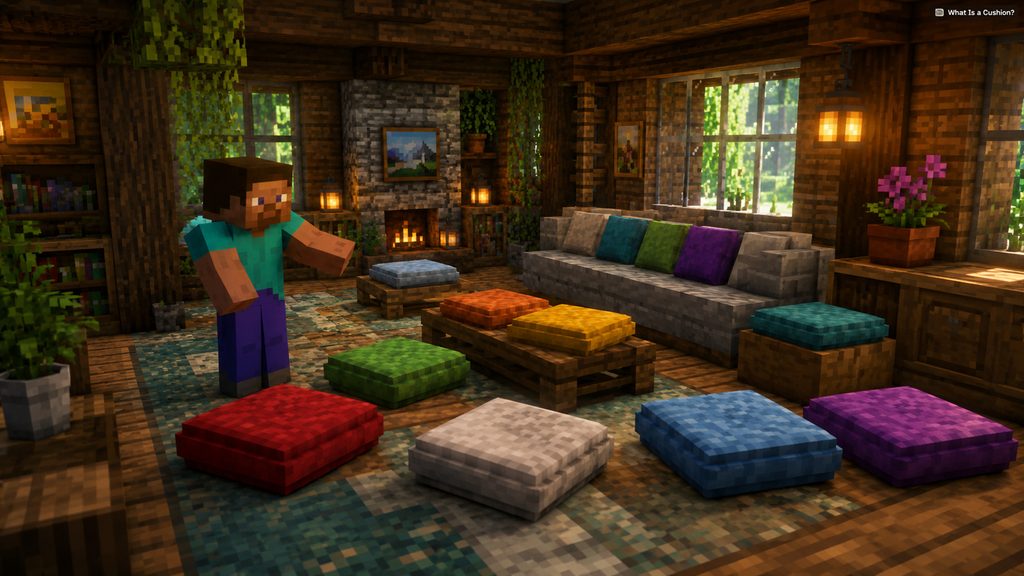
Cushions are available in the same range of colors associated with wool, making them especially useful for detailed interior builds. You can match them with carpets, beds, banners, wool blocks, or other furniture elements.
Cushions are also much smaller visually than a bed, so they work well in places where a full-size furniture block would look awkward.
Good places to use Cushions include:
- Living-room sofas
- Campfire seating
- Café tables
- Bedrooms
- Libraries
- Outdoor patios
- Castle halls
- Multiplayer meeting areas
The biggest advantage is simple: the furniture is not only decorative. Players can actually interact with the Cushion and sit on it.
How to Craft a Cushion in Minecraft
The Minecraft Cushion recipe uses three Wool Slabs of the same color.
To craft one:
- Obtain wool in the color you want.
- Turn the wool into matching Wool Slabs.
- Open a crafting table.
- Place three matching Wool Slabs horizontally across one row.
- Collect the finished Cushion.

For example, three purple Wool Slabs create a purple Cushion, while three red Wool Slabs create a red Cushion.
Using matching slabs is important because the Cushion’s color is determined by its crafting material. You cannot normally mix several differently colored Wool Slabs and expect the game to choose a random result.
This also means builders can prepare several colors before starting a furniture project. If your house uses spruce wood with dark-green decorations, green Cushions may fit naturally. A modern quartz build might look better with white, gray, cyan, or black Cushions.
Craft several at once if you plan to build a sofa or large seating area.
How to Sit on a Cushion in Minecraft
Sitting on a Cushion is much easier than older Minecraft furniture tricks.
First, place the Cushion on a suitable surface. Face it and press your normal Use/Interact control. On Java Edition, this is normally right-click with a mouse. Once activated, your character moves into a seated position on the Cushion.
To stand back up, use your Sneak control.

For most Java players, this means pressing Shift. Controller and mobile players should use whatever button is currently assigned to Sneak.
One important thing to understand is that a Cushion is not a bed. Sitting on it does not skip nighttime, and it should not be treated as a replacement for a normal bed when setting your respawn location.
Its purpose is seating and decoration.
That makes Cushions particularly useful in multiplayer worlds. Instead of players awkwardly standing around a table or campfire, everyone can have an actual seat.
Cushion Placement Rules and Building Tips
Cushions become much more useful once you treat them as part of a larger furniture build rather than simply placing them in the middle of the floor.
A Cushion requires suitable support beneath it. If the supporting setup changes, the Cushion may no longer remain where you originally placed it.
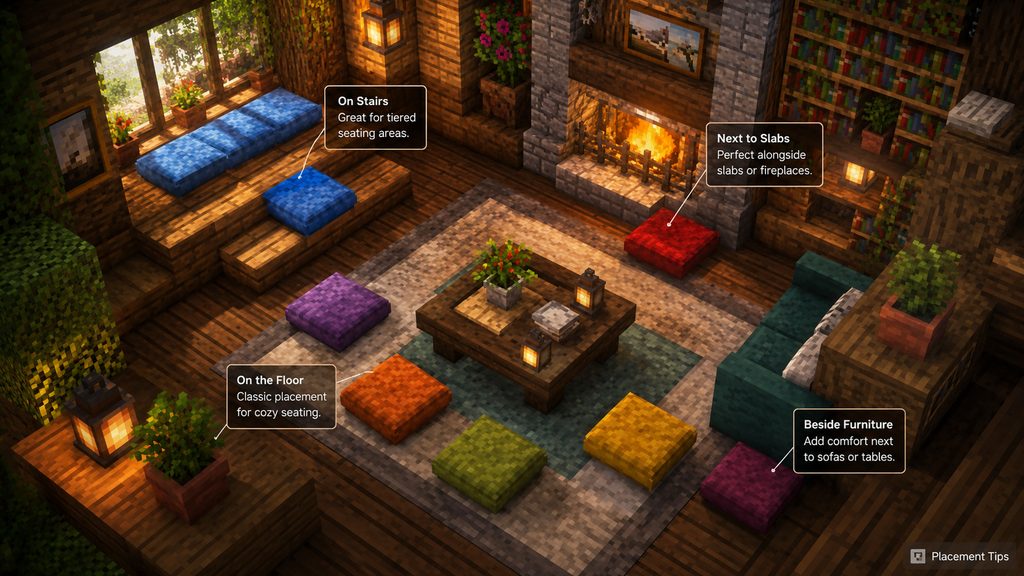
For clean furniture designs, try placing the Cushion first and then building decorative blocks around it.
Useful combinations include:
- Cushion + stairs for an armchair design
- Multiple Cushions for a long sofa
- Cushion + trapdoors for decorative armrests
- Cushion + slabs for low seating
- Cushion + table for a dining area
- Cushion + campfire for an outdoor campsite
Because Cushions take up less visual space than traditional improvised Minecraft chairs, you can fit more seats into compact builds.
Be careful when surrounding one with solid blocks. Cushions need a flat supporting surface, break when that support is removed, and cannot overlap another Cushion.
Test complicated designs before building dozens of copies.
Why Can’t I Place or Use a Cushion?
If your Minecraft Cushion is not working, the first thing to check is your game version.
Cushions require Java Edition 26.3 or Bedrock Edition 26.50. If you are playing an older stable version, the item does not exist in normal vanilla gameplay.

Bedrock players should update to 26.50 or newer rather than enabling an old Preview experiment.
If you already have the Cushion but cannot place it, check these common causes:
- The block underneath does not provide proper support.
- Another Cushion is interfering with the same position.
- The support block was removed or moved.
- Surrounding solid blocks are interfering with placement.
- You are following instructions from an older snapshot or Preview.
- Your Bedrock version is older than 26.50.
If the Cushion places correctly but you cannot sit, aim directly at the Cushion before using the Interact button.
If an older tutorial shows different behavior, update to the newest stable patch for your edition before rebuilding the furniture.
Java vs Bedrock Cushion Differences
The basic Cushion experience is designed to be very similar between Minecraft Java Edition and Bedrock Edition, and both now receive it through stable Wilderness Bound releases.

| Feature | Java Edition | Bedrock Edition |
|---|---|---|
| Cushion available | Java 26.3 stable | Bedrock 26.50 stable |
| Can sit on Cushion | Yes | Yes |
| Colored variants | Yes | Yes |
| Main recipe | Matching Wool Slabs | Matching Wool Slabs |
| Stand up | Sneak | Sneak |
Use Java 26.3 or Bedrock 26.50 and update to the latest available hotfix for your platform.
Older snapshot or Preview tutorials may show placement behavior that changed before release, so prefer instructions written for the stable versions.
If you are experimenting with advanced furniture designs, always confirm them in the build you currently play.
Cushion Decision Guide
| Your goal | Best choice | Important detail |
|---|---|---|
| Create a usable seat | Place a Cushion on a flat supported surface | Interact to sit and use Sneak to stand |
| Match a color scheme | Craft with three Wool Slabs of the same color | All 16 standard Wool colors are available |
| Build a sofa | Combine Cushions with Wool Stairs, slabs or decorative armrests | Leave the Cushion accessible for interaction |
| Fix a broken seat | Check the support block and remove overlapping Cushions | The Cushion breaks if its support is removed |
| Skip the night | Use a normal bed or Straw Bed instead | A Cushion provides seating only |
Plan the full furniture set with our Wool Stairs and Wool Slabs guide, compare seating with the Straw Bed guide, or browse the Minecraft Blocks & Items hub. Cushions can also appear in the camps covered by our Abandoned Camp seed guide.
Official Release Sources
- Minecraft Java Edition 26.3 release notes — recipe, colors, sitting and placement rules.
- Minecraft Bedrock Edition 26.50 changelog — stable Bedrock availability and Abandoned Camp placement.
Frequently Asked Questions
Can you actually sit in Minecraft now?
Yes. Cushions released in Java 26.3 and Bedrock 26.50 allow players to interact with a Cushion and enter a proper seated position without needing a boat, minecart, mod, or command.
What is the Minecraft Cushion recipe?
A Cushion is crafted using three matching Wool Slabs arranged horizontally. The color of the Wool Slabs determines the color of the Cushion you receive.
How do you get off a Cushion?
Press your normal Sneak control. Java players commonly use Shift, while Bedrock controller and mobile players should use their configured Sneak button.
Does sitting on a Cushion set your spawn point?
No. A Cushion is a seating and decoration item. It does not replace a normal bed for skipping the night or setting your usual respawn point.
Why don’t I have Cushions in Minecraft?
You are probably playing an older version. Update to Java Edition 26.3 or Bedrock Edition 26.50 or newer.
Final Recommendation
Minecraft Cushions are one of the most useful furniture additions for builders because they combine decoration with a real sitting mechanic. Craft them from three matching Wool Slabs, choose colors that fit your build, and place them on properly supported surfaces. If a Cushion refuses to appear, place, or work, check your Minecraft version before rebuilding your furniture. The feature is now stable; use current-version placement rules rather than snapshot-era tutorials.
Continue Exploring
How to Make an Automatic Jukebox in Minecraft 26.4 (Music Disc Playlists)
Build a two-block automatic Jukebox Playlist, control Music Disc order, skip tracks and troubleshoot Java Snapshot or Bedrock Preview setups.

Minecraft Shelf Mushroom Guide: How to Find, Grow, Bounce & Use It
Discover yourCushionBy GamerCubic Editorial TeamEdited by: GamerCubic TeamLast checked: September 21, 2026Version checked: Minecraft Java Edition 26.3 and Bedrock Edition 26.50 stable releases Minecraft...

Minecraft Straw Bed: Recipe, Uses and Why It Does Not Set Your Spawn
Discover yourCushionBy GamerCubic Editorial TeamLast checked: September 21, 2026Version checked: Minecraft Java Edition 26.3 / Bedrock Edition 26.50 — Wilderness Bound Quick answer: A...