Minecraft Ancient City Map: How to Get the Buried Ancient City Map in 26.3
Ancient
By GamerCubic Editorial Team
Last checked: September 20, 2026
Version checked: Minecraft Java Edition 26.3 stable — Wilderness Bound

Minecraft Java Edition 26.3 now includes the Buried Ancient City Map, an Explorer Map that guides players toward an Ancient City. Mojang’s final 26.3 release notes confirm that Abandoned Camps can contain maps for Ancient Cities and that Explorer Maps now use distinct item types and icons.
The item was originally called the Ancient City Map, but Mojang later renamed it to the Buried Ancient City Map. The new name makes sense because Ancient Cities generate deep underground rather than appearing on the surface.
For years, players searching for an Ancient City had to explore Deep Dark biomes manually, search beneath mountainous areas, use external seed-map tools, or rely on commands such as /locate. The Buried Ancient City Map now gives survival players a much more natural way to begin the search.
Structure path: Start at the Minecraft Structures hub. Use our Abandoned Camp seeds to find the map source faster, then use the secret rooms guide before exploring the Ancient City itself.
Buried Ancient City Map: Quick Route
| Goal | Best method | What to expect |
|---|---|---|
| Find one without cheats | Loot Abandoned Camp chests and barrels | The camp may contain a Buried Ancient City Map or a map to another structure |
| Use a map you already found | Follow the map marker, then search below the destination area | The map points to the area; the city remains underground in the Deep Dark |
| Find exact coordinates for testing | Use the locate command in a copied world with commands enabled | Fastest for verification, but not a normal Survival route |
What Is the Buried Ancient City Map?
The Buried Ancient City Map is a new Explorer Map that points players toward an Ancient City.
Minecraft 26.3 Snapshot 7 expanded the Explorer Map system with maps for several structures, including Ancient Cities, Trial Chambers, Mineshafts, Desert Pyramids, Jungle Pyramids, Warm Ocean Ruins, and Woodland Mansions.

Explorer Maps were also changed into their own individual items instead of simply being renamed Filled Maps. This gives each type of Explorer Map its own identity and icon.
The Ancient City version was initially called the Ancient City Map before being renamed the Buried Ancient City Map during later 26.3 snapshots.
For players who prefer Survival mode without cheats or external tools, this is one of the most useful exploration additions in Minecraft 26.3.
How to Get the Buried Ancient City Map
To get a Buried Ancient City Map, you need to explore the new Abandoned Camps found in the Overworld.
Abandoned Camps are ruined campsite structures that can appear across different biomes. They have different layouts depending on where they generate and contain various loot containers.

The 26.3 snapshot cycle expanded these camps by adding Explorer Maps to their loot.
The basic process is:
Find an Abandoned Camp → Search its loot → Find a Buried Ancient City Map → Follow the map toward the Ancient City.
However, not every Abandoned Camp will necessarily contain the Ancient City map. Camps can provide Explorer Maps leading to several different destinations.
You may instead find a map for a Mineshaft, Trial Chamber, Desert Pyramid, Woodland Mansion, another Abandoned Camp, or another structure.
Because of this, players may need to explore multiple camps before obtaining the exact map they want.
Where to Find the Map Inside an Abandoned Camp
Once you discover an Abandoned Camp, search the entire campsite carefully.
Do not check one chest and immediately leave.
Abandoned Camps have several variants, meaning their layouts and loot container positions can differ. Look around ruined shelters, wooden sections, barrels, chests, tents, and other parts of the campsite.

The Buried Ancient City Map can appear as part of the new Explorer Map loot associated with these camps.
If you find another Explorer Map instead, keep it. That map could lead you toward another useful structure or even another Abandoned Camp, giving you another opportunity to find the Ancient City version.
Exploring multiple camps can therefore create an entire chain of exploration across your Minecraft world.
How to Use the Buried Ancient City Map
Using the Buried Ancient City Map works similarly to other Explorer Maps.
Hold the map and look at your player marker. The structure marker on the map represents the Ancient City destination.
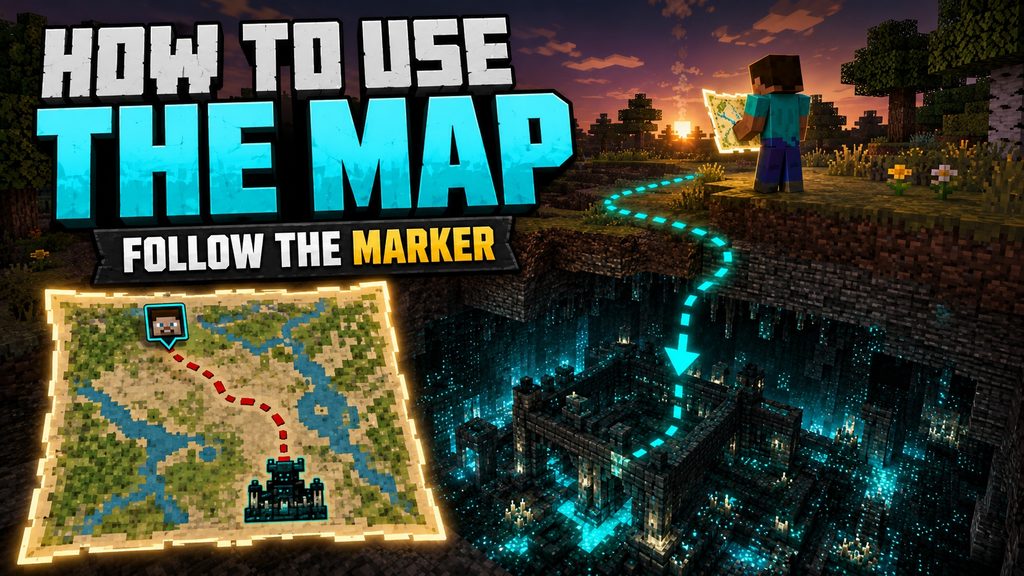
Move in a direction that causes your player marker to get closer to the structure marker.
The modern Explorer Map system also makes navigation easier because the player icon shows the direction the player is facing.
If your marker appears at the edge of the map, you are still far away. Continue travelling until your position begins moving toward the center and closer to the Ancient City symbol.
Bring enough food and travel supplies because the Ancient City may be a significant distance away from the Abandoned Camp where you found the map.
Does the Map Show the Exact Ancient City Location?
The Buried Ancient City Map takes you to the correct area, but there is one important detail: the Ancient City is underground.
You will not reach the marker and see an Ancient City sitting on the surface.
Once your marker reaches the destination area, you still need to search below ground.

Look for signs of the Deep Dark biome, including:
- Sculk
- Sculk veins
- Sculk sensors
- Sculk shriekers
Finding these blocks is a strong indication that an Ancient City or Deep Dark area may be nearby.
Avoid digging straight down. Ancient City regions can contain huge caves, dangerous drops, and hostile terrain.
Instead, dig downward using a staircase or locate a nearby cave system and descend gradually.
The map removes much of the random searching, but Minecraft still keeps the final discovery as an underground adventure.
Is This the Fastest Survival Way to Find an Ancient City?
For normal Survival players, the Buried Ancient City Map is now one of the most convenient legitimate methods for locating an Ancient City.
Before this feature, players often had to search beneath mountain regions and explore enormous underground cave systems while hoping to discover a Deep Dark biome.
The new process is much clearer:
Find Abandoned Camp → Search loot → Get Buried Ancient City Map → Follow map → Search underground.

There is still some luck involved because you first need to locate an Abandoned Camp and then obtain the correct Explorer Map.
However, once you have the map, it dramatically reduces the amount of completely random underground exploration required.
For players who do not want to use cheats, seed viewers, or third-party tools, this is likely to become one of the most useful ways to hunt Ancient Cities.
What to Bring Before Entering an Ancient City
Finding an Ancient City is only half the challenge. Surviving inside one can be much harder.
Ancient Cities contain sculk sensors and sculk shriekers that detect vibrations. Triggering enough shriekers can eventually summon the Warden, one of the most dangerous mobs in Minecraft.

The best strategy is usually stealth rather than combat.
Bring wool blocks, because wool can help control vibrations when navigating around sculk systems.
You should also bring:
- Strong armor
- A good pickaxe
- Plenty of food
- Wool blocks
- Building blocks
- Torches
- A bow
- Water bucket
- Extra inventory space
- Emergency healing items
Move slowly through the city and crouch when necessary.
Avoid unnecessary jumping, block breaking, projectiles, or other actions that can create vibrations near sculk sensors.
Fighting the Warden directly is rarely worth the risk. Ancient City exploration is much easier when you focus on avoiding detection and collecting loot quietly.
Buried Ancient City Map vs /locate Command
The Buried Ancient City Map and the /locate command can both help you find Ancient Cities, but they are designed for very different players.
The /locate command is much faster.
With commands enabled, Minecraft can immediately provide coordinates for a nearby Ancient City. You can then travel directly to the location.

The Buried Ancient City Map is designed for players who want to stay within normal Survival gameplay.
Instead of receiving coordinates instantly, you must find an Abandoned Camp, search its loot, obtain the map, follow it across the world, and then search underground.
It takes longer, but it creates a real exploration journey.
For Creative worlds or testing, /locate is better.
For Survival players who want to avoid cheats, the Buried Ancient City Map is the better experience.
Official Sources and Version Evidence
- Minecraft Java Edition 26.3 release notes — confirms Abandoned Camp Explorer Maps and the Buried Ancient City Map in the stable release.
- Mojang’s Deep Dark overview — explains Ancient City generation, sculk detection, and Warden risk.
FAQs
Can you get an Ancient City Map in Minecraft?
Yes. Minecraft 26.3 introduces the Buried Ancient City Map, an Explorer Map that can guide players toward an Ancient City.
Is the Buried Ancient City Map in Minecraft 26.2?
No. The feature belongs to the Minecraft 26.3 development cycle and was introduced through the new Abandoned Camp Explorer Map system.
Can cartographer villagers sell the Buried Ancient City Map?
The current 26.3 system focuses on obtaining the Buried Ancient City Map from Abandoned Camp loot rather than introducing it as a new cartographer villager trade.
Does the map take you directly inside the Ancient City?
No. The map guides you toward the correct area, but the Ancient City remains underground. You still need to descend into the Deep Dark and locate the structure.
Is the Buried Ancient City Map better than /locate?
The /locate command is faster, but the Buried Ancient City Map is better for normal Survival gameplay because it allows you to find Ancient Cities without using cheats.
Continue Exploring

10 Best Mushroom Island + Ocean Monument Seeds for Minecraft 26.3
Ten source-traceable Java 26.3 mushroom island + ocean monument seeds compared with locally calculated spawn and structure data.
10 Best Woodland Mansion Seeds Near Spawn for Minecraft 26.3
Ten source-traceable Java 26.3 woodland mansion seeds compared with locally calculated spawn and structure data.
10 Best Mushroom Island Seeds Near Spawn for Minecraft 26.3
Ten source-traceable Java 26.3 mushroom island seeds compared with locally calculated spawn and structure data.