How to Find and Grow Red Shrubs in Minecraft 26.3
Find
By GamerCubic Editorial Team
Last checked: September 21, 2026 | Verified against the stable Java 26.3 and Bedrock 26.50 release notes

A Red Shrub is a new decorative plant block found in small patches inside Minecraft’s Dappled Forest biome. After collecting one, place it on suitable ground and apply Bone Meal. If an adjacent space is valid and empty, another Red Shrub grows nearby. The plant can also be placed in a Composter and used as crimson ground cover for autumn-themed builds.
Version note: Red Shrubs are now available in the stable Java Edition 26.3 and Bedrock Edition 26.50 Wilderness Bound releases.
Red Shrub Quick Facts
| Feature | Confirmed information |
|---|---|
| Block type | Decorative plant |
| Natural location | Small patches in the Dappled Forest |
| Multiplication method | Use Bone Meal to create one in a random valid adjacent space |
| Practical uses | Decoration and composting |
| First Java build | Minecraft 26.3 Snapshot 1 |
| First Bedrock build | Preview 26.40.27 |
| Current status | Released in Java 26.3 and Bedrock 26.50 |
Red Shrubs are not Red Poplar Leaves: the leaves grow on trees, while shrubs cover the forest floor.
Where Do You Find Red Shrubs in Minecraft?
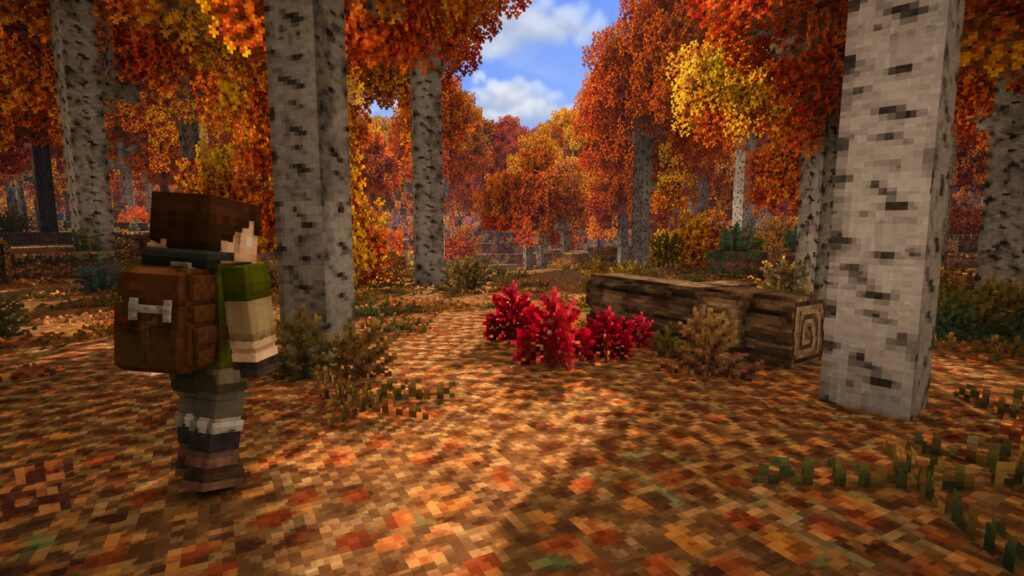
Search inside a Dappled Forest, the autumn Overworld biome found near cold biomes. Its pale Poplar trunks and red, orange and yellow canopy distinguish it from ordinary forests. Look around trees, fallen logs and open ground.
Red Shrubs generate in small groups and can blend into leaf litter. If you still need the biome, read what a Dappled Forest is in Minecraft or use our best Dappled Forest seeds for Minecraft 26.3.
Java 26.3 players with cheats enabled can locate the biome with:
/locate biome minecraft:dappled_forestThe returned coordinates lead to the biome, not directly to an individual shrub. Search the ground after arriving.
How Do You Collect a Red Shrub?
Break the Red Shrub, collect the dropped plant and return it to your base. The stable Java 26.3 release notes do not list a special collection tool requirement.
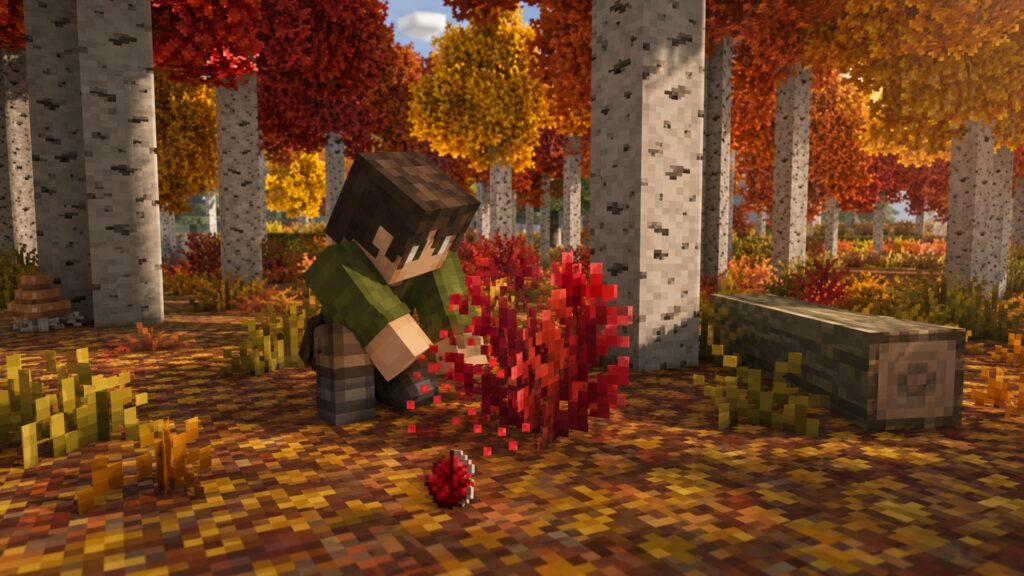
If an older guide says the block is still experimental or requires snapshot access, check its date: Red Shrubs are now part of the stable Wilderness Bound release.
One shrub is enough to begin multiplying them with Bone Meal.
How Do You Grow and Farm Red Shrubs?
Red Shrubs do not grow into large bushes or trees. Bone Meal makes a new Red Shrub appear in a random adjacent valid space.

Use this simple multiplication method:
- Place one Red Shrub on suitable ground.
- Clear plants and blocks from the surrounding spaces.
- Keep valid ground beneath those empty spaces.
- Apply Bone Meal to the original shrub.
- Collect or leave the new shrub, then repeat.
A flat patch provides more neighboring positions. If nothing appears, remove nearby obstacles and try again. Mojang has not published a guaranteed Bone Meal success rate.
For an organized garden, use separate patches and leave one shrub in each as a permanent starter.
Bone Meal chooses a random neighboring position rather than upgrading the original plant. That means a narrow or cluttered area wastes possible placements. A five-by-five grass patch with the starter near the center gives the shrub room to spread, although Mojang has not named an official farm layout. Keep Bone Meal nearby and harvest the outer growth.
What Are Red Shrubs Used For?
The Red Shrub is primarily decorative. Its deep color works well in:
- Autumn gardens and woodland paths
- Poplar cabins and Dappled Forest bases
- Medieval or fantasy landscaping
- Abandoned and overgrown ruins
- Seasonal village decorations
- Color transitions between red leaves and green grass

Red Shrubs also work in a Composter. Mojang confirms this use but does not publish an exact composting chance.
One starter plant can supply a growing patch near your base, reducing return trips to distant forests.
Are Red Shrubs Available in Java and Bedrock?
Yes. Red Shrubs are available in survival gameplay in stable Java Edition 26.3 and Bedrock Edition 26.50.

Match the edition and build named by a guide. If a seed or coordinate fails, first check for a version mismatch.
Red Shrub Decision Guide
| Your goal | Best action | Expected result |
|---|---|---|
| Find the first shrub | Search open ground and leaf litter inside a Dappled Forest | Natural shrubs appear in small patches |
| Multiply a collection | Place one shrub near several empty valid spaces and apply Bone Meal | A new shrub attempts to grow in a random adjacent space |
| Create controlled landscaping | Use separate starter patches and harvest outer growth | The center plants remain available for repeated propagation |
| Gather the full biome palette | Collect Poplar saplings and Shelf Mushrooms during the same trip | One expedition supplies canopy, ground cover and trunk decoration |
| Use excess shrubs | Place spare plants in a Composter | The shrubs contribute to composting rather than filling storage |
Continue with the Dappled Forest seed guide, the Poplar Tree guide and the Shelf Mushroom guide. More related pages are organized in the Minecraft Blocks & Items hub.
Official Release Sources
- Minecraft Java Edition 26.3 release notes — natural generation, composting and Bone Meal propagation.
- Minecraft Bedrock Edition 26.50 changelog — stable Wilderness Bound release for Bedrock.
Frequently Asked Questions
Can you grow Red Shrubs with Bone Meal?
Yes. Bone Meal creates another Red Shrub in a random adjacent space when a valid location is available.
Do Red Shrubs need shears?
No special tool requirement is listed in Mojang’s stable Java 26.3 release notes. Break the shrub and collect the dropped plant.
Can Red Shrubs be composted?
Yes. Mojang lists the Red Shrub as a plant that can be placed in a Composter.
Where do Red Shrubs naturally generate?
They generate in small patches inside the Dappled Forest biome.
Are Red Shrubs available in survival mode?
Yes. They can be found and collected in survival gameplay in Java 26.3 and Bedrock 26.50.
Their autumn color and Bone Meal multiplication make Red Shrubs useful renewable ground cover for builders and creative landscaping throughout your evolving Minecraft world.
Continue Exploring
How to Make an Automatic Jukebox in Minecraft 26.4 (Music Disc Playlists)
Build a two-block automatic Jukebox Playlist, control Music Disc order, skip tracks and troubleshoot Java Snapshot or Bedrock Preview setups.

Minecraft Shelf Mushroom Guide: How to Find, Grow, Bounce & Use It
Discover yourFindBy GamerCubic Editorial TeamEdited by: GamerCubic TeamLast checked: September 21, 2026Version checked: Minecraft Java Edition 26.3 and Bedrock Edition 26.50 stable releases Minecraft...

Minecraft Cushion Guide: How to Sit, Craft Cushions & Fix Placement Problems
Discover yourFindBy GamerCubic Editorial Team Edited by: GamerCubic Team Last checked: September 21, 2026 Version checked: Minecraft Java Edition 26.3 / Bedrock Edition 26.50...